
Have you ever used your Google or Spotify account in an app to access your Google Calendar or your Spotify playlists? OAuth is the invisible backbone of secure, permission-based access in today’s connected web. Whether you’re syncing calendars, posting tweets from a third-party tool, or integrating cloud services, OAuth is doing the heavy lifting behind the scenes. In this article I will explain what is OAuth, why does it matter and how does it actually work.
What is OAuth 2.0?
OAuth 2.0 stands for Open Authorization. It is an industry-standard protocol for authorization. It supports authorization flows across a wide range of applications from web browsers to smart devices in your living room. OAuth 2.0 an authorization protocol that allows third parties to gain access to a user’s resources without knowing the user’s password.
Imagine you would like to use a photo editing app on your computer but you would like to save the edited image directly to Google drive. The app provides an options to save the image into Google drive but first you need to authorize yourself to get access to your drive inside the application. We will cover every step later but for demonstration, the authorization flow in that case looks like this:

Why is it useful?
OAuth 2.0 is a delegation protocol, a way to give someone else permission to do something on your behalf, without handling over your credentials. It provides a secure and standardized way for applications to access user resources without compromising sensitive information. By separating the roles of resource owner, client, and authorization server, OAuth enables more flexible and scalable authentication and authorization flows. This makes it especially useful in modern web and mobile applications, where users expect seamless integration between services while maintaining control over their personal data.
The key goals of OAuth
- Let users approve one app to access data from another
- Never expose user passwords
- Support granular, revocable permissions
Roles in the OAuth Ecosystem
In the OAuth 2.0 ecosystem, several distinct roles interact to ensure secure and efficient authorization. These roles describe the relationships between different entities involved in the process and each role has it’s own responsibilities.
| Role | Description |
|---|---|
| Resource Owner | The user who owns the data (you) |
| Client | The app requesting access (photo editing app) |
| Authorization Server | The place where permissions are granted (Google Auth Server) |
| Resource Server | Where the data lives (Google Drive) |
How OAuth 2.0 works?
At the beginning of this article I showed you a diagram about a photo editing application using Google Drive. Since we covered the roles in the previous section, let me extend the diagram a little bit to show more details about the authorization flow.
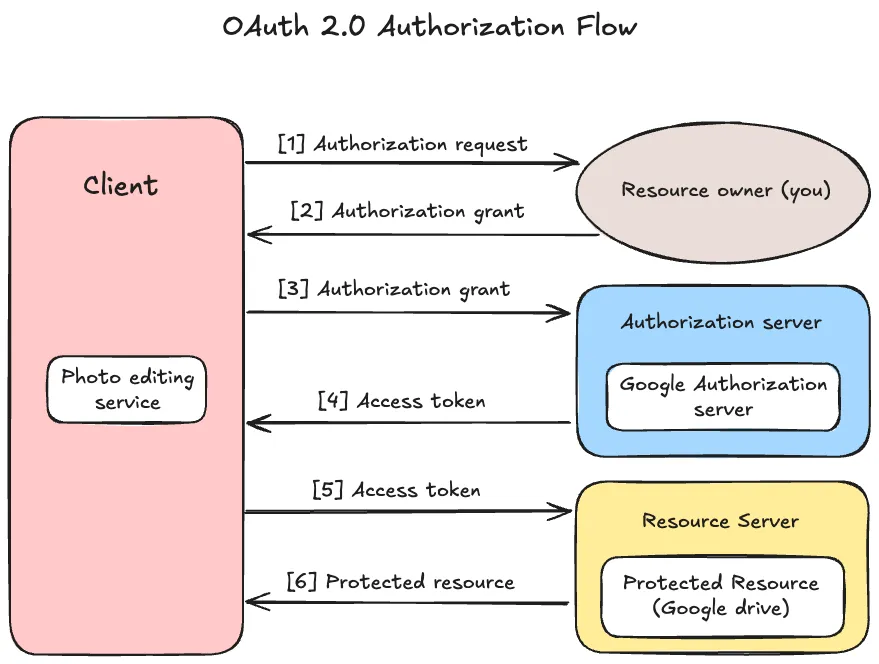
This diagram describes an abstract OAuth 2.0 flow between the four roles. Let’s go through the process one by one.
- The client (photo app) asks the resource owner (you) for permission to access the resource server (your Google Drive). This request can be made directly to you, or more commonly, via the authorization server as an intermediary.
- After you grant permission (e.g., by clicking the “Allow” button), the client receives an “authorization grant” from you. This grant is a credential representing your consent, which the client will use in the next step.
- The client now requests an access token from the authorization server, presenting the authorization grant it received from you. The access token will be used to access protected resources.
- The authorization server authenticates the client and checks the validity of the authorization grant. If everything is valid, it issues an access token.
- Using the access token, the client requests the protected resource (e.g., photos from Google Drive) from the resource server. The client authenticates itself by presenting the access token.
- The resource server checks if the access token is valid. If the token is valid, it processes the request and returns the requested resource (e.g., the photos) to the photo app.
OAuth Flow in Real-World Scenarios
Let’s explore a few more examples to understand how OAuth works in practice.
Example 1: Social Media Integration
Imagine you’re a social media manager handling multiple brand accounts across platforms like Facebook, Instagram, and LinkedIn. You use a post scheduling tool to plan and automate content publishing.
- To enable posting on your behalf, the scheduling app needs permission to access your social media accounts.
- When you connect your Instagram (or other platform) account, you’re redirected to Instagram’s OAuth authorization server.
- There, you log in and are asked to approve specific permissions—such as the ability for the app to post content, access your business pages, or view performance analytics.
- Once you authorize it, the app receives an access token that it uses to interact with Instagram’s API. This token allows it to publish scheduled posts to your page, fetch insights, or manage comments—without ever knowing or storing your password.
- The permissions (or scopes) granted can be finely controlled. For example, you can allow the app to post content but not manage your profile or access private messages.
Example 2: Appointment Management
Imagine you’re using an online appointment scheduling tool, whether it’s for booking a fitness session, a medical appointment, or a virtual business consultation. To avoid double-booking and improve convenience, the app wants to integrate with your personal calendar, like Google Calendar or Microsoft Outlook.
- When you connect your calendar account, the app redirects you to the calendar provider’s OAuth authorization server (e.g., Google).
- You’re prompted to log in and then asked to grant specific permissions, such as reading your existing events and creating new ones.
- Once you approve, the app receives an access token, which it can use to communicate with the calendar API on your behalf.
- Using this token, the scheduling app can automatically check for free time slots, create calendar events for your confirmed appointments, and even send reminders, all without ever seeing your password.
Example 3: Payment Processing
When you purchase something online and choose to pay using PayPal, you’re effectively using OAuth. The online store doesn’t need to handle or store your PayPal credentials instead, it redirects you to PayPal’s authorization server, where you grant permission for the store to process your payment.
- When you choose “Pay with PayPal” at checkout, you’re redirected to PayPal’s OAuth authorization server.
- You log in and are prompted to approve the transaction, allowing the website to charge a specific amount.
- After approval, PayPal issues an access token to the merchant’s app, which can then complete the transaction on your behalf, within the limits you just authorized.
- The merchant never sees your login credentials or card details. Instead, the access token acts as a temporary, scoped permission to complete the payment.
Impact of OAuth
OAuth’s impact in modern applications is profound. I collected some key ways how OAuth 2.0 has transformed modern authorization:
Improved Security
Before OAuth, many applications relied on users sharing their passwords to access data across different platforms. This approach is risky because it exposes sensitive information. OAuth mitigates this risk by using short-lived access tokens that are scoped to a specific action or resource.
Better User Experience
OAuth enables users to sign in and authenticate once (with a service like Google or ICloud) and then easily grant access to third-party apps without having to manage multiple usernames and passwords. This provides a smoother, more streamlined user experience.
Reduced Dependency on Passwords
By using tokens instead of passwords, OAuth reduces the need for users to manage multiple credentials. This helps prevent password fatigue and also reduces the likelihood of weak or reused passwords.
Wide Adoption Across Platforms
OAuth is supported by nearly all major web services and platforms, including Google, X, Microsoft, GitHub, and many more. This widespread support makes our life easier when we would like to use one of these services integrated in our applications.
OAuth vs. OpenID Connect
While OAuth is often discussed alongside OpenID Connect (OIDC), it’s important to note that OAuth itself doesn’t handle authentication, it only handles authorization. This means OAuth lets you grant an application access to your resources, but it doesn’t tell that application who you are.
OpenID Connect, on the other hand, is built on top of OAuth 2.0 and adds an authentication layer. So, when you log into an app using Google or ICloud, OAuth handles the authorization to access your Google or ICloud data, while OpenID Connect authenticates you as the user.
Conclusion
OAuth is one of the foundational protocols driving the security and functionality of modern web applications. From scheduling social media posts to booking appointments, integrating calendars, or processing payments, OAuth powers many of the experiences users rely on every day, often without them even realizing it. It provides a flexible and standardized way for applications to request limited access to user data while giving users full control over what they share and with whom.